Skip to content

Features

A complete guest Wi‑Fi platform for UniFi.

Everything below is included in every plan. Plans only differ in the number of sites, access points and guests.

Guest sign-in

A fast, friendly sign-in that works on every phone.

E-mail sign-in with instant access
Guests get online at once during a short grace period while they confirm their e-mail by link or numeric code.
Confirm from any device
The code can be typed on the portal from another phone or laptop.
Vouchers
Short printed codes instead of e-mail, with plans, batches and expiry dates.
Paid Wi‑Fi
Guests buy a voucher plan by card on the login page and also get the code by e-mail. You get paid into your own Stripe account, in CHF or EUR; you only pay Stripe’s fees.
Sponsor approval
Guests can name a sponsor who unlocks them — or you can require a sponsor to approve every access, restricted to your domains.
Automatic language
Italian, German, French, English and Spanish, chosen from the phone’s language.
Anti-abuse checks
Typo suggestions, disposable-address blocking, domain checks and rate limits.
Your link after sign-in
A branded “Access activated” page that leads to the page you choose.
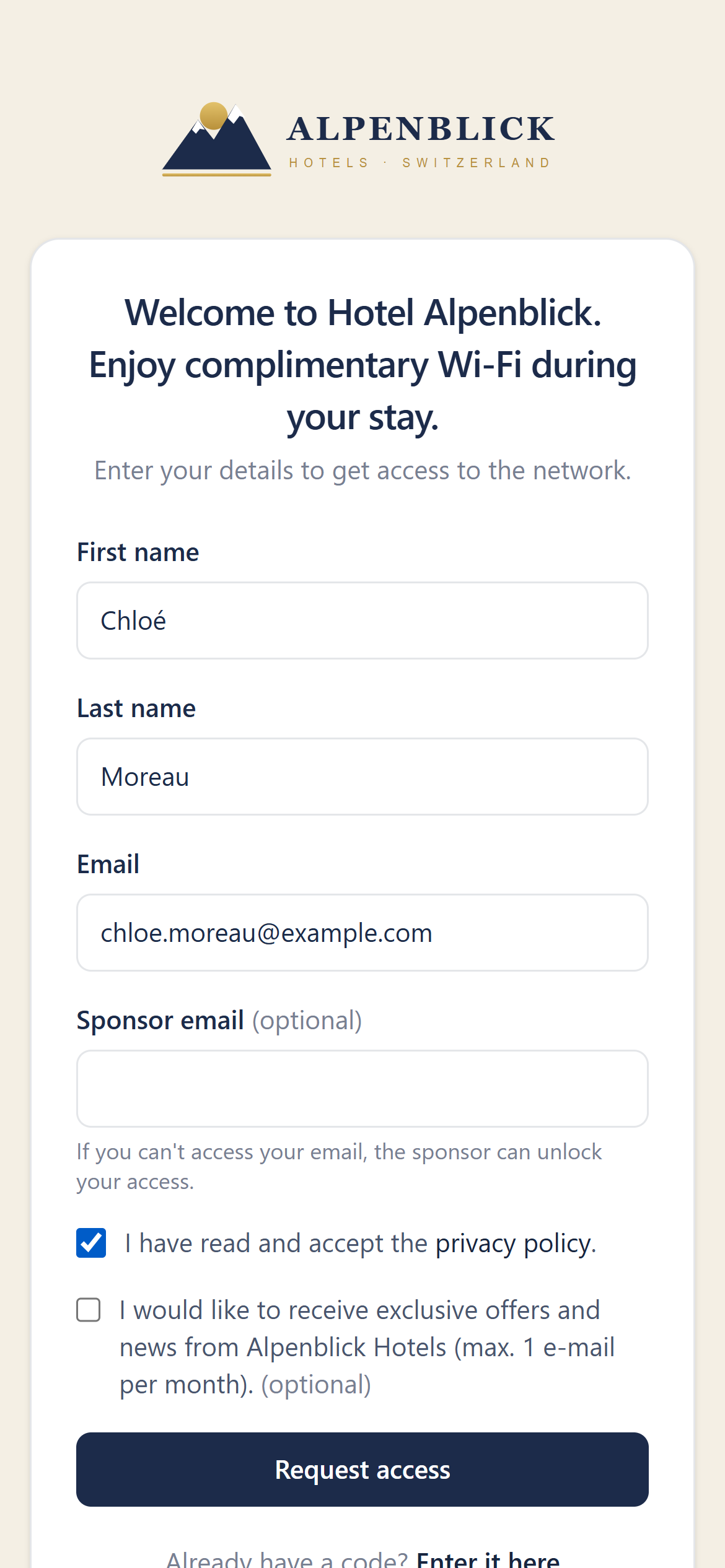
Guest sign-in form filled in with name and e-mail
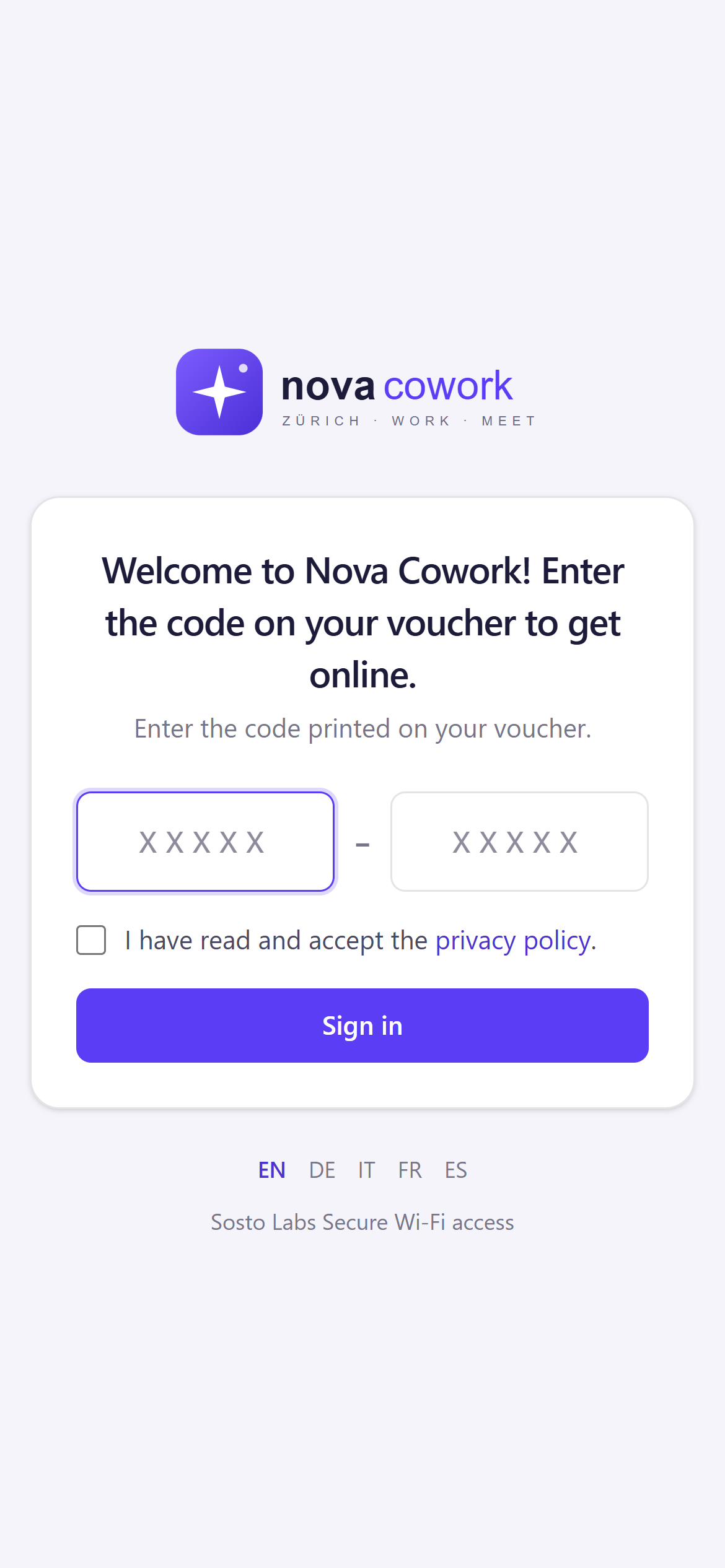
Voucher sign-in page on a phone

Guest access

Three ways to let guests in

Choose for each site how guests connect: with their e-mail, with a voucher or with a code you give them. You can change your mind at any time; it applies to new guests.

E-mail

Each guest signs up with their own e-mail.

Ideal for hotels, offices, events: you know who connects.

For the guest

What they do
Enter their e-mail and confirm with the link or code they receive.
When they get online
Straight away for a few minutes, to read the e-mail; then after confirming.
For how long
For the duration you set or, if you allow it, for the days they choose.
Several devices
Each device signs up.

Data and privacy

Data you collect
A confirmed e-mail, plus the fields you choose (name, company, phone…).
Privacy notice
Always accepted, in the version in force.
Marketing contacts
With the guest’s consent, after the e-mail is confirmed.

For you

What you prepare
Nothing: guests do it all themselves.
Sponsor
Optional or required (see below).
Removing access
Revoke the guest in the admin panel.

Voucher

A personal code, printed or bought online, valid for a set time.

Ideal for hotels and campsites that sell or give away access.

For the guest

What they do
Enter the voucher code.
When they get online
Straight away.
For how long
From first use, for the length of the voucher.
Several devices
As many as the voucher allows.

Data and privacy

Data you collect
Only the fields you choose.
Privacy notice
Always accepted.
Marketing contacts
No: there is no e-mail.

For you

What you prepare
Voucher plans and batches to print or send, or plans on sale with Stripe.
Sponsor
—
Removing access
Revoke the voucher, a whole batch or one device.

Access codeNew

One code for everyone, chosen by you.

Ideal for holiday rentals, B&Bs and small guesthouses.

For the guest

What they do
Enter the code you gave them.
When they get online
Straight away.
For how long
For the duration you set.
Several devices
Every device that uses the code; you can set a maximum.

Data and privacy

Data you collect
Only the fields you choose.
Privacy notice
Always accepted.
Marketing contacts
With consent and confirmation by e-mail (double opt-in).

For you

What you prepare
One code, which you can change whenever you like.
Sponsor
—
Removing access
Change the code and, if you want, disconnect everyone who used the previous one.

With e-mail you can add a sponsor

The sponsor is a colleague or the host the guest is visiting. You decide how much it counts.

Optional

Guests can name one; they still connect with their own e-mail.

Required, the sponsor approves

Guests get online only after the sponsor clicks in the e-mail.

Required, immediate access

Guests get online straight away; the sponsor is notified and can remove access.

All three modes work with the Guest Experience, the welcome page guests see before connecting.

Guide: choosing the access mode

Wi‑Fi control

Connected to UniFi through the official Integration API.

UniFi Integration API
Connect each site with the console address and an API key, test the connection and pick the UniFi site. Works with UniFi OS consoles running UniFi Network 9.x or 10.x.
Session length
Grace period and full session length, per portal or per site.
Speed and data limits
Download and upload limits per device (up to 100 Mbit/s) and data caps, enforced by your access points.
Instant revoke
Disconnect a guest in one click.
Always in sync
Sessions are reconciled with UniFi every two minutes.
Site suspension
Stop new sign-ins at a site with a message to guests in five languages.
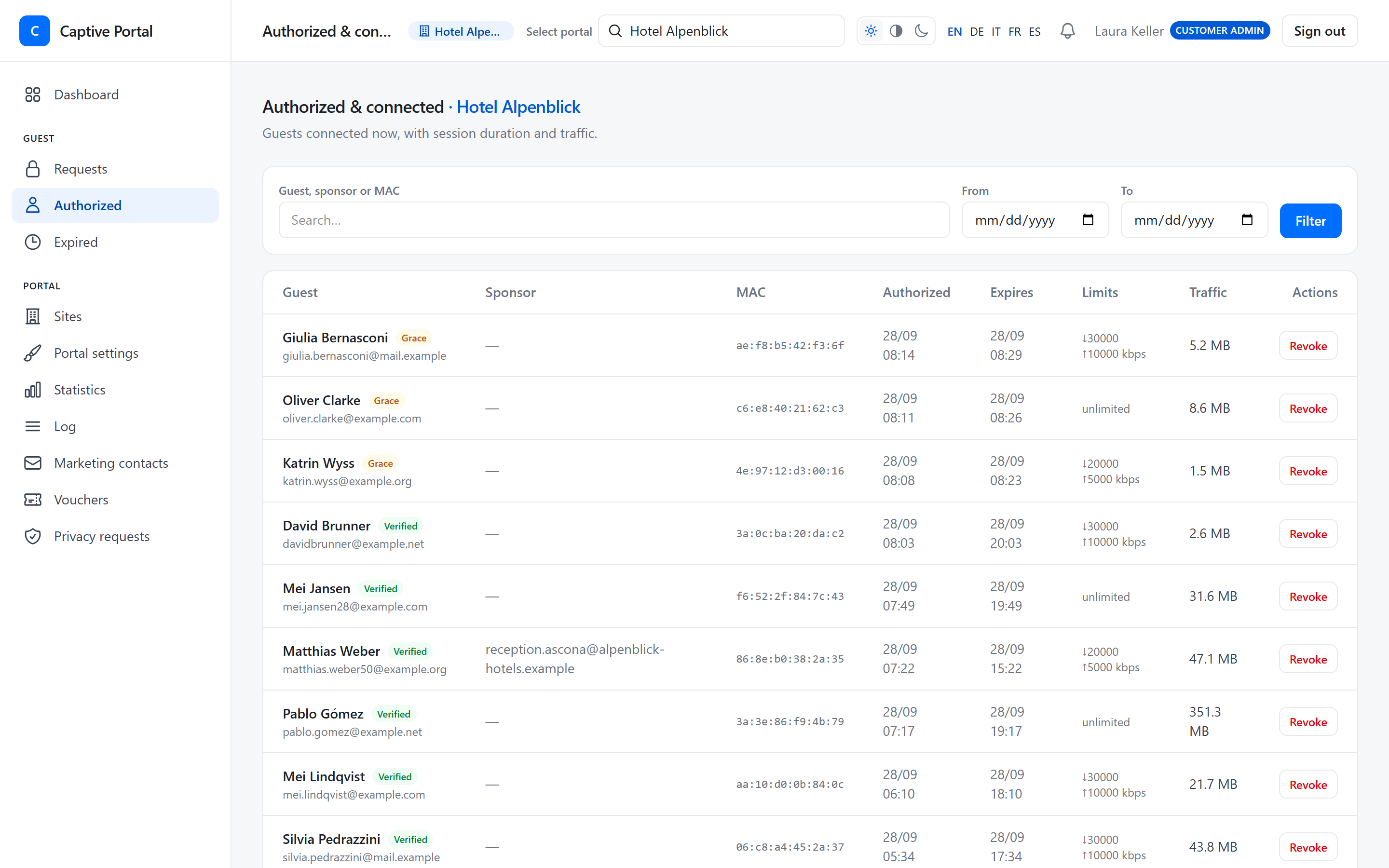
List of connected guests with session times, speed limits, live traffic and a Revoke button

Branding

A portal that looks like your business, not like ours.

Logo and colours
Four colours with automatic contrast for button text, and a live preview.
Texts in five languages
Welcome and marketing texts for each language.
Per-site overrides
Each site can have its own look, languages and access mode.
Your e-mail sender
Verification e-mails sent from your address through your own mail server, with a safe fallback.
Dark mode
The guest portal follows the phone’s dark mode.
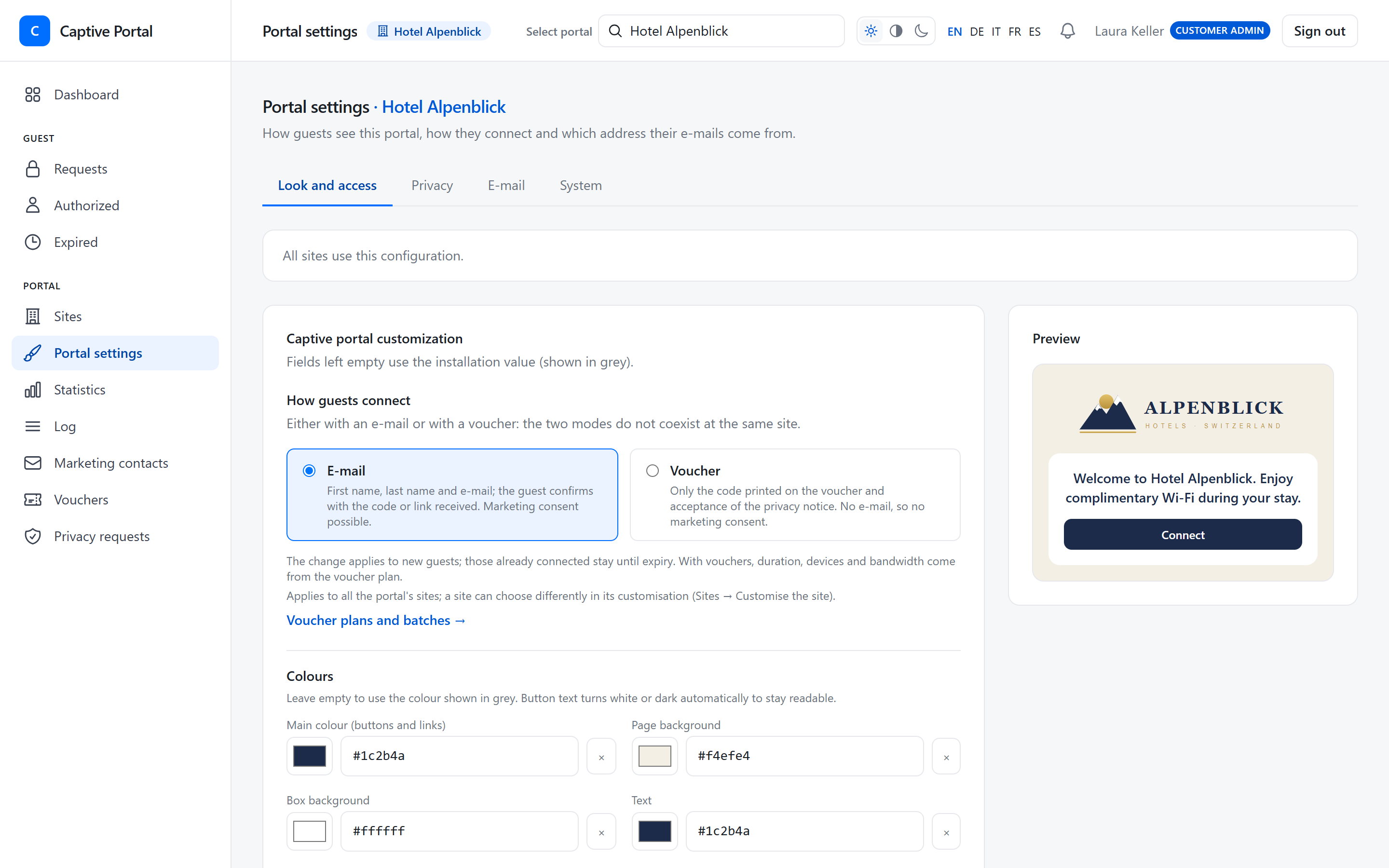
Portal settings: access mode (e-mail or voucher), colours and a live preview of the guest page

Privacy

Designed to help you configure guest Wi‑Fi for GDPR and the Swiss nLPD.

Versioned privacy notice
Immutable versions in five languages; each registration linked to the version accepted.
Marketing consent
Optional, never pre-ticked; opted-in contacts exportable and revocable.
Retention and anonymisation
Personal data anonymised after the period you set; statistics are kept.
Access and erasure
Export a guest’s data as JSON or erase it.
Hosted in Switzerland
Guest data stored in Switzerland; secrets encrypted at rest; MAC addresses masked in technical logs.
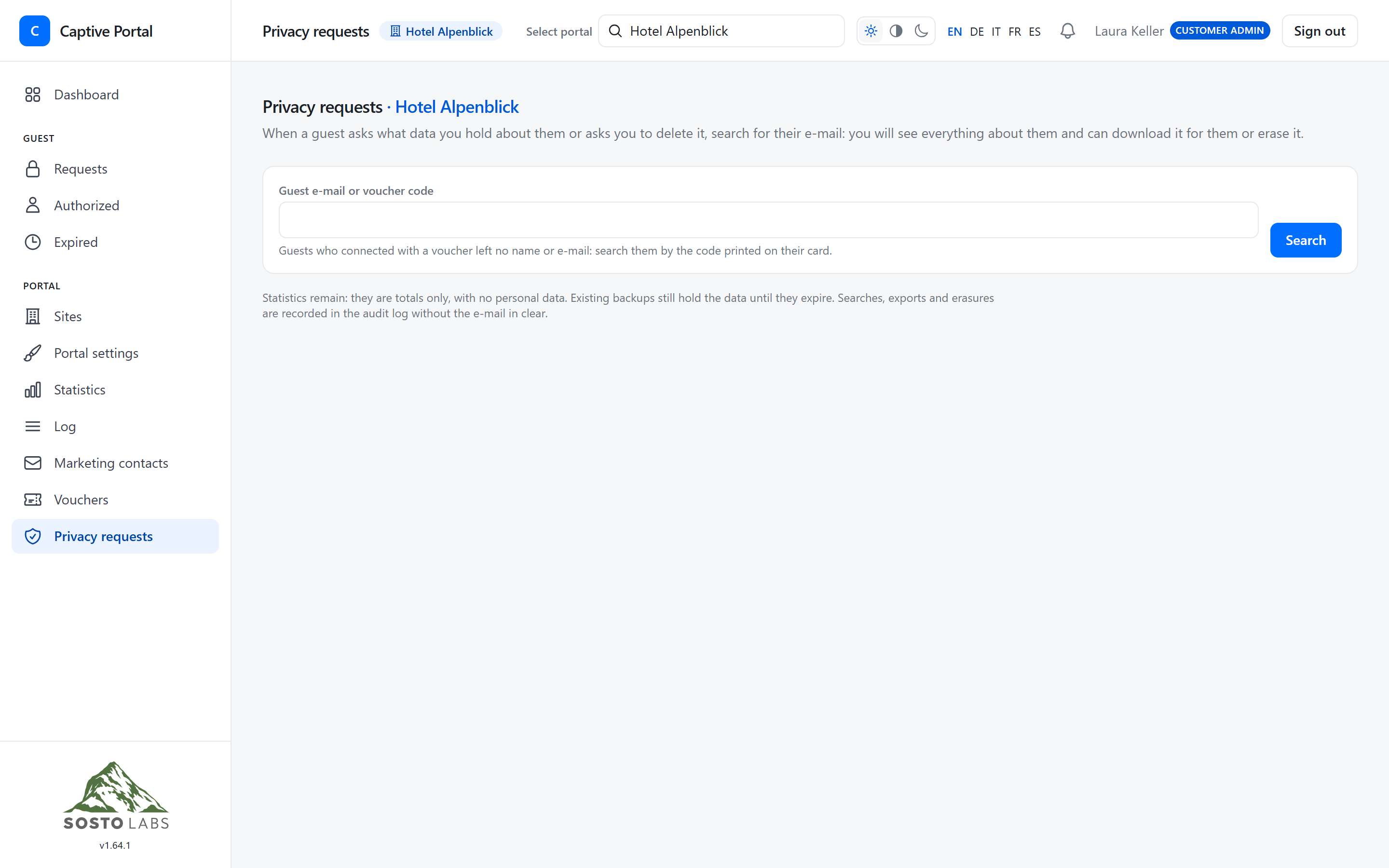
Data subject requests: search a guest, export or erase their data

Integrations

Contacts with marketing consent go straight into your Mailchimp audience, and unsubscribes come back on their own.

Automatic sync
Every new contact with marketing consent reaches your audience within a minute, with no manual exports.
Unsubscribes in sync
Unsubscribing in Mailchimp also withdraws consent in the portal; withdrawing it in the portal unsubscribes the contact in Mailchimp.
Fields and tags
First and last name go into your audience fields; site and guest language as tags, if you want.
Contacts already collected
Send your earlier contacts in one go too, with a preview and progress.
Consent only
Only people who opted in are sent; an erasure request also deletes the contact from Mailchimp.
Your own account
Each portal connects its own Mailchimp account with an API key, encrypted and never shown.

Mailchimp® is a registered trademark of The Rocket Science Group. Sosto Labs is not affiliated with Mailchimp.

Intuit Mailchimp logo

Statistics & logs

Know how your Wi‑Fi is used — without keeping more personal data than you need.

Dashboard
Pending, verified and active guests, today’s registrations and the month’s usage.
Statistics
Traffic, guests per site, peak hours and days, busiest access points, languages, devices, new vs returning.
CSV everywhere
Export the guest log, each chart and marketing contacts.
Guest log
Search by guest, sponsor or device and filter by date.
Real-time alerts
A live notice in the panel when a guest gets access or waits for a sponsor’s approval. Minimal data only — never e-mail or MAC — and each user can switch it off.
Notifications
Alerts when the monthly guest quota reaches 80, 90 and 100%.
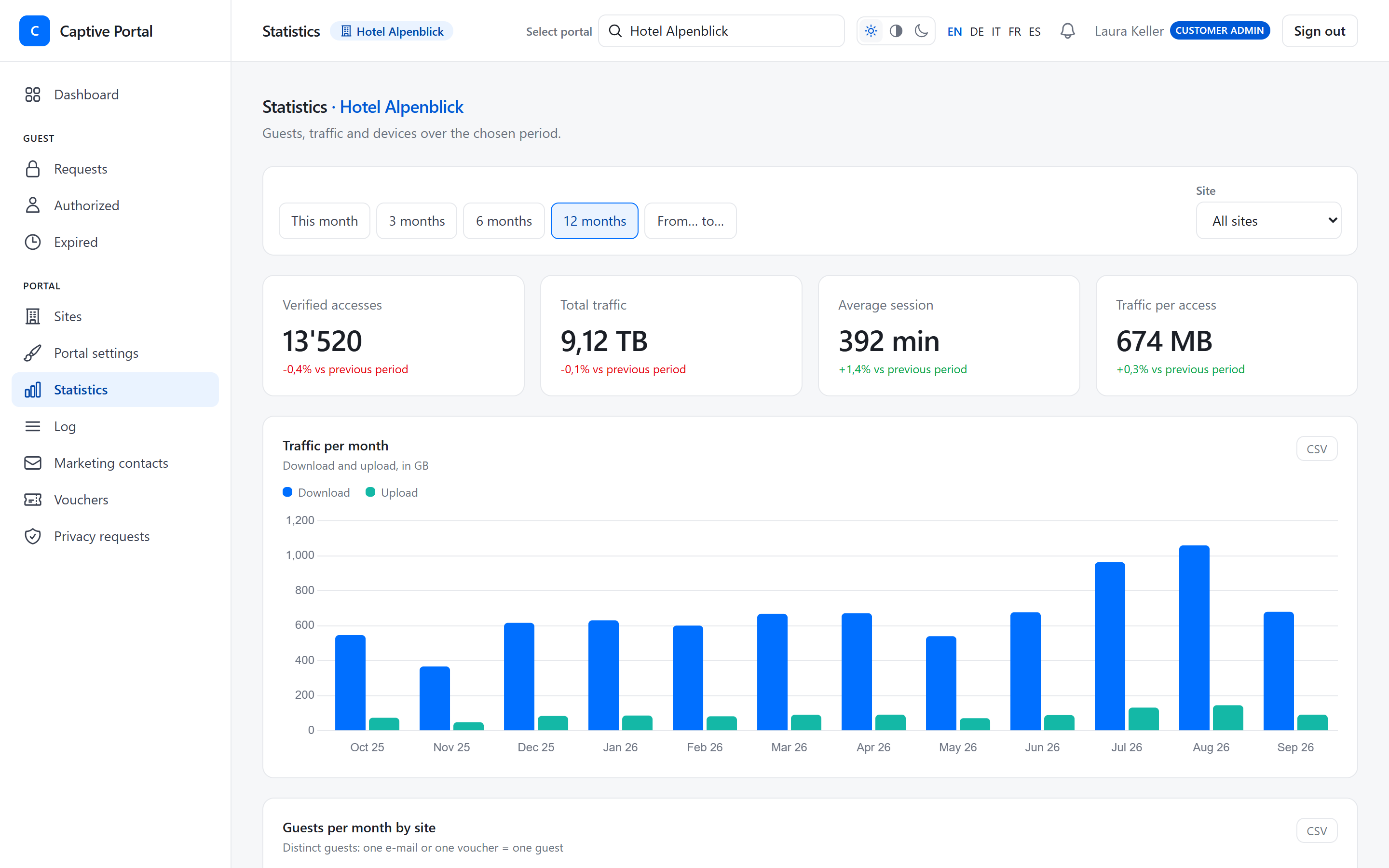
Statistics page with verified accesses, total traffic and a monthly traffic chart

Teams & multi-site

From one hotel to a network of locations.

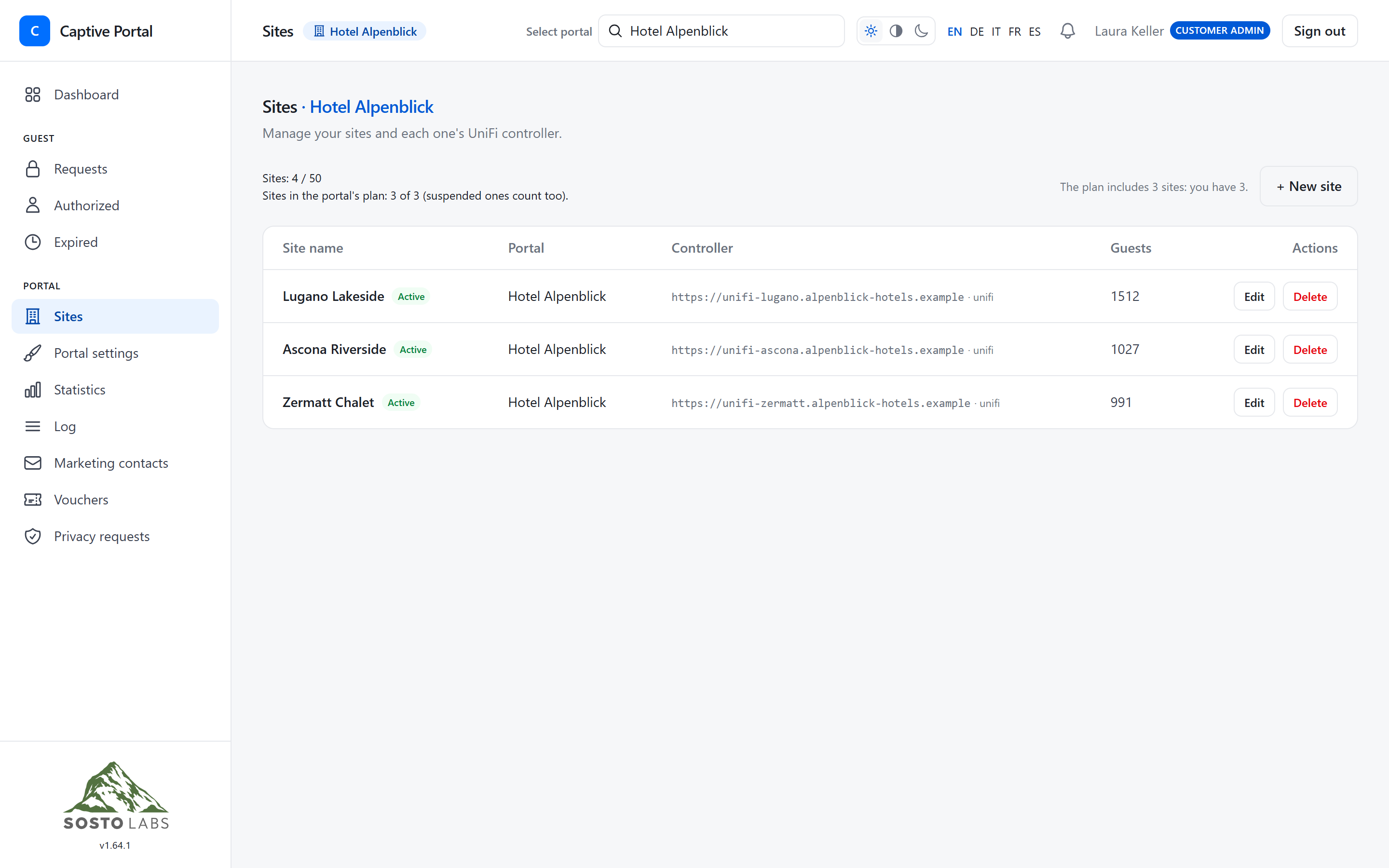
Multiple sites
From 1 to 25 sites per plan, each with its own UniFi controller.
Several administrators
Invite colleagues by e-mail; they set their own password.
Two-factor authentication
TOTP two-factor sign-in for administrators, with recovery codes.
Resellers
IT partners manage several customer portals without access to guest personal data.
Light, dark and mobile
The admin panel works on any screen, in five languages.
Sites list with three hotel locations, each with its UniFi controller

New · Guest Experience

A digital house guide for holiday rentals and B&Bs

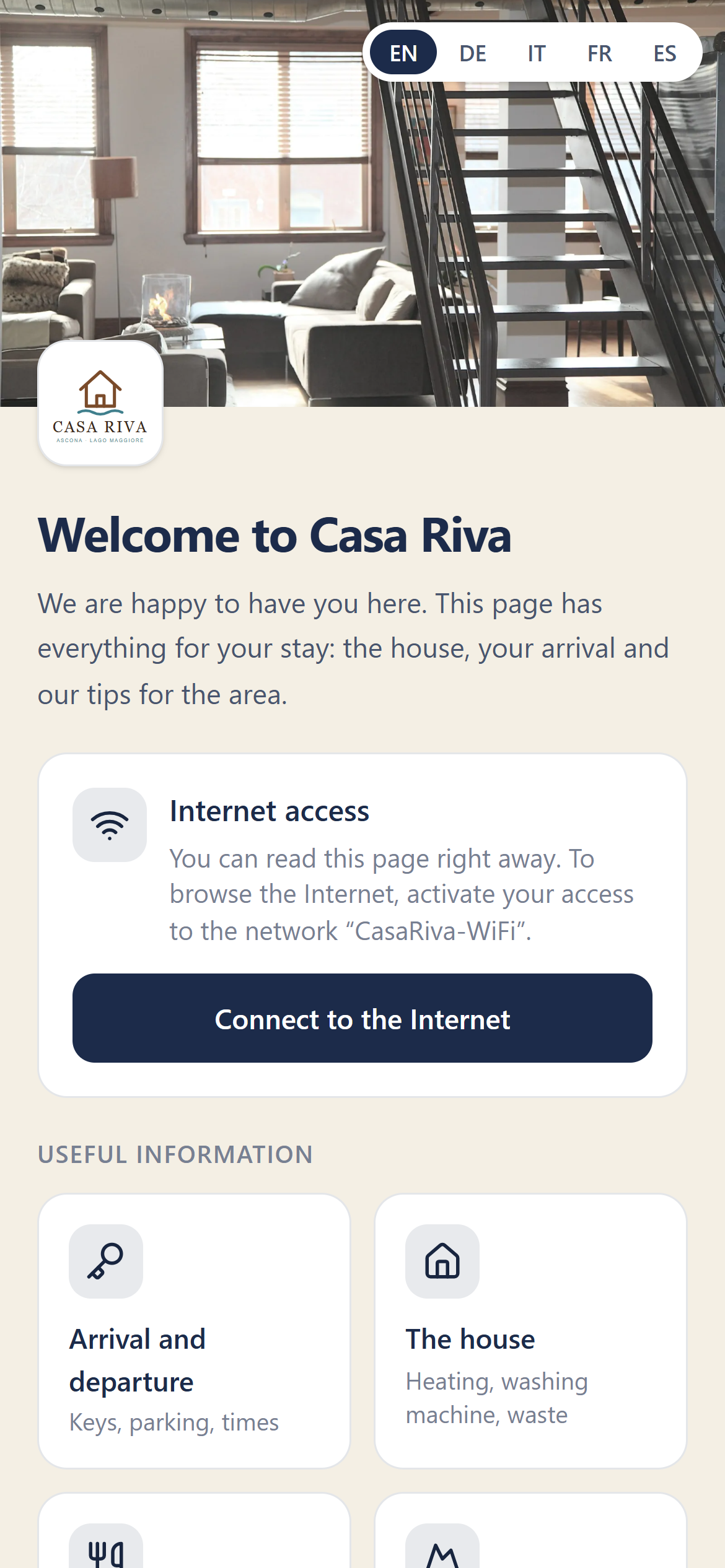
A welcome page with check-in, house rules, restaurants and day trips, opened with a QR code or when guests join the Wi‑Fi.

Discover the Guest Experience
Guest Experience welcome page on a phone: photo of the house, welcome message, Wi‑Fi box and information tiles

Give your guests a Wi‑Fi welcome worthy of your brand.

Start your 14-day free trial and connect your first UniFi site today.